


Dropdown menus are displayed when the user interacts (i.e. hovers over or clicks) on an item in a menu or navigation on a website.
The major benefit of dropdown menus is that they can help website visitors navigate around the website quicker and find exactly what they are looking for with fewer clicks. By using dropdown menus, you can reduce the number of links that the visitor is initially presented with in the main menu, reducing a feeling of overwhelm when they first land on the website.
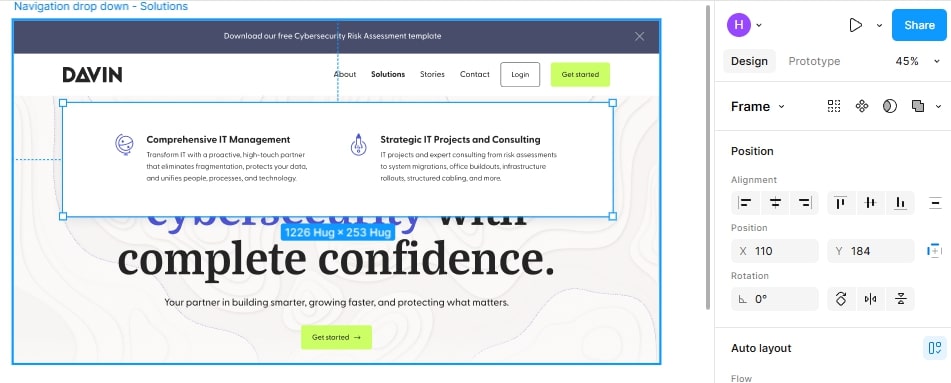
Dropdown menus can range from a super simple list of links, stacked one on top of the other, to much more complex mega menus that display many links and even other types of content or features.
In this post, I’m going to let me share my advice for designing effective dropdown menus, and share some inspiration from websites I’ve built and other websites I love.
Design dropdown menus even if the website doesn’t initially need them
As a web developer who works with web designers, I often find the designs for dropdown menus are missing from the website designs because the website doesn’t initially have a need for dropdown menus. This is usually because there aren’t a lot of pages on the website in the beginning, and all the pages can be linked neatly in the main menu without it becoming overwhelming.
However, nearly every time I’ve built a website from designs that haven’t included a design for dropdown menus, the client has eventually come back and asked for the option to add a dropdown menu. So, to avoid this happening, it’s best to include a design for a dropdown menu from the get go; even if it’s just a really simple list of links that show when you hover over the parent link.
Sometimes a simple dropdown is enough
When deciding how you should design a dropdown menu it’s important to consider the type of content that will be featured on the website.
If you are designing a website for a service-based business that doesn’t have lots of content, like products and blog posts, then a simple, one column style dropdown menu might be best.
For example, on the Pilates East website that I built (designed by Maddy Russell), we created super simple dropdown menus. As they don’t have loads of internal pages like an ecommerce store or a blog, they don’t need anything more complex than this. A simple dropdown menu helps to keep all the links organised.

I also like that Maddy added a little arrow on the design next to any links that have a dropdown menu to indicate that there’s more to see here.
Consider using a mega menu if there are lots of internal links
If the website you’re designing has a lot of links, like an ecommerce website, a website that is primarily a blog, or a website for a business with a lot of offerings, consider creating a mega menu.
A mega menu is a dropdown menu that is much larger than your standard one column list of links. It often spans the full width of the website and contains multiple columns of links and other content.
The great thing about mega menus is that they can display a lot more content, making it a lot easier for visitors to find what they’re looking for with fewer clicks.
On the Sacred Hour website that I built (designed by Studio Blanche), we created a custom mega menu that displays multiple columns of text and image links.

Sacred Hour is a wellness spa offering many different services include massages, facials, pedicures, manicures and more. By splitting these services into columns based on the type of treatment, we can fit more links on the screen and make it easy for the user to find exactly what they are looking for.
Add dynamic features to the mega menu
Mega menus can display more than just links to pages on a website, so don’t be afraid to play around and get creative!
On the Conscious Life & Style website that I built (designed by Gatto) we created a mega menu that not only displays a list of blog subcategories, but that also automatically displays the three latest blog posts from that particular category along with the featured image for that post. This encourages users to jump straight into the blog posts before navigating to a category archive page on the blog.

Don’t forget about how dropdown menus will work on mobile!
When designing dropdown menus it’s important not to overlook how these will look and function on mobile devices.
We will talk more about designing mobile menus in an upcoming blog post, but I wanted to give you an example of a website that has dropdown menus on the desktop version of the website that translate well on to the mobile version of the website.
Something Vintage Rentals is an event rental company who have a vast collection of items that you can rent for weddings, parties, photo shoots and other events.
On the desktop version of the website (developed by me, designed by Gatto), we created a mega menu to display links to the different categories and subcategory pages of their rental inventory.

On mobile, this menu changes to just show a list of the main categories. When you click on a category, it will expand to reveal the subcategories. This helps to reduce the size of the menu on mobile devices while still keeping all of the links organised.

When you’re working on your next website design, think about how you can use dropdown menus effectively to help users find what they’re looking for with fewer clicks.
And remember, even if the website you’re designing doesn’t require any dropdown menus from the outset, include them in your design regardless. Your client (and your developer, if you’re using one!) will be very grateful!
Are you ready to outsource your website development?
If you’re a web designer who loves creating beautiful websites but hates the coding side of things, I can help!
I specialise in turning designs into fully-functioning WordPress websites that not only look beautiful but that are also functional, strategic and fast.
Learn more about collaborating with a developer
Join my free email community for regular insights into working with a web developer, advice for designing strategic websites, and other behind the scenes bits and bobs.


